Linux usb2ether from Tom Sun
2012年7月23日 星期一

App 如何指定可支援的機子?
上架時,遇到一個問題:若是想讓自己的 App 避開某些機子,如『不適合在 3gs 或其規格以下的機子執行』,該怎麼辦呢?
這裡提供了一個方法,搭配 Apple 所訂的 Device Compatibility Matrix,就能用規格來卡位。
例如:『不適合在 3gs 執行』這個條件,就根據 Matrix 來找出 3gs 不支援的功能,像是 "front-facing-camera" or "gyroscope" 都可以,把它設定到你的 App Plist 的 "required device capabilities",將來就可以在你的 iTunes App 黃頁,巨大 Icon 的下方,看到 3gs 沒有被列入了!
參考文件: App related resources.
這裡提供了一個方法,搭配 Apple 所訂的 Device Compatibility Matrix,就能用規格來卡位。
例如:『不適合在 3gs 執行』這個條件,就根據 Matrix 來找出 3gs 不支援的功能,像是 "front-facing-camera" or "gyroscope" 都可以,把它設定到你的 App Plist 的 "required device capabilities",將來就可以在你的 iTunes App 黃頁,巨大 Icon 的下方,看到 3gs 沒有被列入了!
參考文件: App related resources.
2012年6月1日 星期五
統計程式碼
想要統計程式行數,又是 bash 新手等級,查到好心網友的指令:
拿 linux source 來試試,沒問題。但是在我的 project 下,出現 error:
修正後可以了:
最後加上 wc :
find . \( -name *.h -or -name *.c \) -print拿 linux source 來試試,沒問題。但是在我的 project 下,出現 error:
find: paths must precede expression: CADebugMacros.h修正後可以了:
find . \( -name '*.h' -or -name '*.c' \) -print最後加上 wc :
find . \( -name '*.h' -or -name '*.c' \) -exec cat "{}" ";" | wc -l 2012年5月31日 星期四
XCode 4.3 Extended Modules
從開發環境 XCode 4.2 migrate to XCode 4.3 以後,原本可以 compile 的程式碼出現問題:"CADebugMacros.h" 找不到。
原來這是以前放在 /Developer/Extras/CoreAudio/PublicUtility/** 下面的 header file. 隨著 XCode 4.3 推出,/Developer/** 目錄已經不復存在,一些 Cocoa FrameWork相關的模組內定為不安裝,必須請開發者自己搞定(Apple 內心獨白:呵呵,要付錢才給你用!)
解決這類問題,首先由 XCode 4.3 選單連到 Apple developer 網站:
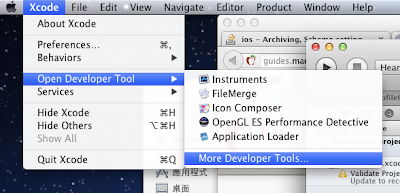
當然,這時出現登入 iOS developer 的畫面,有繳保護費才能繼續玩喔!
登入後,看到 Extended modules:

下載後,可以自行指定要安裝在那兒,以我自己的環境為例, 整包 CoreAudio 目錄安裝於 /Users/tom/Documents/XCodeExtraLibrary/CoreAudio/* :

如上圖,在 XCode 的 Targets -> Build Settings 標籤內,輸入安裝的路徑,就可以解決問題!
原來這是以前放在 /Developer/Extras/CoreAudio/PublicUtility/** 下面的 header file. 隨著 XCode 4.3 推出,/Developer/** 目錄已經不復存在,一些 Cocoa FrameWork相關的模組內定為不安裝,必須請開發者自己搞定(Apple 內心獨白:呵呵,要付錢才給你用!)
解決這類問題,首先由 XCode 4.3 選單連到 Apple developer 網站:

當然,這時出現登入 iOS developer 的畫面,
登入後,看到 Extended modules:

下載後,可以自行指定要安裝在那兒,以我自己的環境為例, 整包 CoreAudio 目錄安裝於 /Users/tom/Documents/XCodeExtraLibrary/CoreAudio/* :

如上圖,在 XCode 的 Targets -> Build Settings 標籤內,輸入安裝的路徑,就可以解決問題!
Private Method in Objective-C
Objective-C 的呼叫是 message passing 方式,只要有 implement method 可以呼叫,就會成功。這種情形下,沒有像 C++ 的 private method,只能靠 Compiler 警告.
實作方法
這裡
Now in 2013 things changed:
Apple 提供的 IDE : XCode 4.5 支援 objective-C 2.0 (大概是這個版本) catetgory,可以提供私有 iVars 與 methods 的宣告了!
Now in 2013 things changed:
Apple 提供的 IDE : XCode 4.5 支援 objective-C 2.0 (大概是這個版本) catetgory,可以提供私有 iVars 與 methods 的宣告了!
2012年4月17日 星期二
iOS project 添加 Three20 支援 (XCode >= 4.0)
Three20 Screencast 指令節錄 網址: http://www.youtube.com/watch?v=-0-E-Z0fihg
Clone project:
git clone git://github.com/facebook/three20.git
Create your own project e.g. TestThree20, paralleled to the git downloads, then you have directories like this:
Documents
    |
    three20
    |
    TestThree20
Then, use one python scrip to automatically import three20 to your project:
python three20/src/scripts/ttmodule.py -p \
 TestThree20/TestThree20.xcodeproj Three20 --xcode-version=4
Now, open your project in XCode, all things were done.
2012年4月1日 星期日
How to create project with Cocos2d and ARC support
Reference from this site :
Tiny tim
Often we want to write our APP under iOS5 with ARC support. But the developers of Cocos2d are still working for transfering the framework to the ARC.
How should we do ? Disable ARC for all Cocos2d files one by one ? Tiny tim has proposed a cleaner way --- managed by sub-project. Here it is :
1. Get cocos2d sources:
Go to https://github.com/cocos2d/cocos2d-iphone
git://github.com/cocos2d/cocos2d-iphone.git
2. Checkout the gles20 branch
git checkout gles20
3. Creating your own project with ARC enabled, by default, it is enabled by the XCode4 templates.

4. Drag and drop cocos2d-ios.xcodeproj to your project, and link cocos2d as a static library to your project.

5. Configure the user header search for YOUR PROJECT (not cocos2d-ios).

6. Configure the recursive searches.

7. Build the project. Note : If you exam "Build settings" of your project , the setting of "Objective-C Automatic Reference Counting" is "Yes". In cocos2d-ios sub-project, the same setting is "No".
Tiny tim
Often we want to write our APP under iOS5 with ARC support. But the developers of Cocos2d are still working for transfering the framework to the ARC.
How should we do ? Disable ARC for all Cocos2d files one by one ? Tiny tim has proposed a cleaner way --- managed by sub-project. Here it is :
1. Get cocos2d sources:
Go to https://github.com/cocos2d/cocos2d-iphone
git://github.com/cocos2d/cocos2d-iphone.git
2. Checkout the gles20 branch
git checkout gles20
3. Creating your own project with ARC enabled, by default, it is enabled by the XCode4 templates.

4. Drag and drop cocos2d-ios.xcodeproj to your project, and link cocos2d as a static library to your project.

5. Configure the user header search for YOUR PROJECT (not cocos2d-ios).

6. Configure the recursive searches.

7. Build the project. Note : If you exam "Build settings" of your project , the setting of "Objective-C Automatic Reference Counting" is "Yes". In cocos2d-ios sub-project, the same setting is "No".
訂閱:
文章 (Atom)